iPhone and iPad Apps for the Blind And Visually Impaired

iPhone & iPad Apps for the Blind &VisuallyImpaired

iPhone & iPad Apps for the Blind &VisuallyImpaired
Showing posts with label FreeApp. Show all posts

Saturday, April 30, 2016

Facebook programs computers to describe photos for the blind


ap.orghttp://www.ap.org
April 5, 2016


FILE - This Feb. 19, 2014, file photo shows the Facebook app icon on an iPhone in New York. A feature rolling out Tuesday, April 5, 2016, on Facebook's iPhone app interprets what's in a photo using a form of artificial intelligence to recognize faces and objects for blind and visually impaired people as they scroll through the pictures posted on the world's largest online social network (AP Photo/Karly Domb Sadof, File)


FILE - This Feb. 19, 2014, file photo shows the Facebook app icon on an iPhone in New York. A feature rolling out Tuesday, April 5, 2016, on Facebook's iPhone app interprets what's in a photo using a form of artificial intelligence to recognize faces and objects for blind and visually impaired people as they scroll through the pictures posted on the world's largest online social network (AP Photo/Karly Domb Sadof, File)
MENLO PARK, Calif. (AP) — Facebook is training its computers to become seeing-eye guides for blind and visually impaired people as they scroll through the pictures posted on the world's largest online social network.
The feature rolling out Tuesday on Facebook's iPhone and iPad apps interprets what's in a picture using a form of artificial intelligence that recognizes faces and objects. VoiceOver, a screen reader built into the software powering the iPhone and iPad, must be turned on for Facebook's photo descriptions to be read. For now, the feature will only be available in English.
Until now, people relying on screen readers on Facebook would only hear that a person had shared a photo without any elaboration.
The photo descriptions initially will be confined to a vocabulary of 100 words in a restriction that will prevent the computer from providing a lot of details. For instance, the automated voice may only tell a user that a photo features three people smiling outdoors without adding that the trio also has drinks in their hands. Or it may say the photo is of pizza without adding that there's pepperoni and olives on top of it.
Facebook is being careful with the technology, called "automatic alternative text," in an attempt to avoid making a mistake that offends its audience. Google learned the risks of automation last year when an image recognition feature in its Photos app labeled a black couple as gorillas, prompting the company to issue an apology.
Eventually, though, Facebook hopes to refine the technology so it provides more precise descriptions and even answers questions that a user might pose about a picture.
The vocabulary of Facebook's photo-recognition program includes "car," ''sky," ''dessert," ''baby," ''shoes," and, of course, "selfie."
Facebook also plans to turn on the technology for its Android app and make it available through Web browsers visiting its site.
The Menlo Park, California, company is trying to ensure the world's nearly 300 million blind and visually impaired people remain interested in its social network as a steadily increasing number of photos appear on its service. On an average day, Facebook says more than 2 billion photos are posted on its social network and other apps that it owns, a list that includes Messenger, Instagram and WhatsApp.
In a Tuesday post, Facebook CEO Mark Zuckerberg hailed the photo description tool as "an important step towards making sure everyone has equal access to information and is included in the conversation."
___
Online:
Facebook's post: https://newsroom.fb.com/news/2016/04/using-artificial-intelligence-to-help-blind-people-see-facebook/

Posted by Unknown at 12:56 PM No comments:
Email ThisBlogThis!Share to XShare to FacebookShare to Pinterest
Labels: Blind, Facebook, FreeApp, hotos, iOS, iPhone, Low vision aids, Messages, messges, Visually Impaired, voiceover, zoom

Saturday, December 19, 2015

Assistive technology is any kind of technology and/or tool that can be used to enhance the functional independence of a person with a disability.

Apple just keeps making it better for those who are blind or visually impaired. iOS 8 comes with more features to make it easier for people with low vision or no vision to get the most from their iOS devices. Following you will find misc. information about using the iDevices as assistive technology. I hope you find this guide helpful as you take this journey into the iWorld. Please note: There are new apps coming out every day. This is not a complete guide but more of a jumping off point.


Built-in Accessibility/Functions to explore:
Built-in accessibility features and the development of thousands of specialized apps have made Apple’s iPhone extremely popular among persons with disabilities. Assignable ringtones create an audible caller ID for the blind;  This section explores the IOS accessibility features, including VoiceOver and Zoom, and reviews blind or low vision-specific apps.

There are many built-in features on iDevices that accommodate those with low vision or no vision and help improve productivity. The iPhone and the iPad have some differences here so it is important that you get the tools that best fits your needs. Apple provides a section just on accessibility option worth exploring but also check out the details of many of those built-in accessibility options in the iOS Technology.

Here are the functions we will be covering.
Guided Access,VoiceOver,VoiceOver with Zoom,Zoom,VoiceOver with Maps,Text Completion,Siri,Siri’s ability to launch apps,White-on-Black,Hands Free,Alternate alerts,Custom vibration patterns for alerts
Word highlights in speak selection.

 Accessibility Options for the blind
You can find these functions in accessibility. 

VoiceOver,  

VoiceOver, the screen reader for blind and low-vision users, is now integrated with Maps, AssistiveTouch, and Zoom.VoiceOver is a revolutionary screen reader that lets you know what’s happening on your Multi-Touch screen — and helps you navigate it — even if you can’t see it. Touch the screen to hear what’s under your finger, then use gestures to control your device. VoiceOver works with the apps that come with your iPhone, iPad, or iPod touch. 
Learn more about VoiceOver

Siri

Siri, Apple’s intelligent assistant, helps you do the things you do every day.1 All you have to do is ask. Say something like “Tell Jay I’m running late” or “Remind me to make reservations for Saturday.” Siri can send messages, place phone calls, schedule meetings, and even turn on and off VoiceOver, Guided Access and Invert Colors. And because Siri is integrated with VoiceOver, you can ask where the nearest sushi restaurant is and hear the answer read out loud.

Speak Selection

If you have a hard time reading the text on your iOS device, use Speak Selection to read your email, iMessages, web pages, and books to you. Highlight text in any application, tap Speak, and Speak Selection reads the selected text aloud. You can adjust the voice’s dialect and speaking rate, and have words highlighted as they’re being read.

Dictation

Dictation lets you talk where you would type. Tap the microphone button on the keyboard, say what you want to write, and your iOS device converts your words (and numbers and characters) into text. So it’s easy to type an email, note, or URL — without typing at all.

Zoom

Zoom is a built-in magnifier that works wherever you are in iOS, from Mail and Safari to the Home and Lock screens. And it works with all apps from the App Store. A simpledouble-tap with three fingers instantly zooms in 200 percent, and you can adjust the magnification between 100 and 500 percent. While you’re zoomed in, you can still use all of the familiar gestures to navigate your device. And Zoom works with VoiceOver, so you can bettersee — and hear — what’s happening on your screen.

Font Adjustments

When you activate Larger Dynamic Type, the text inside Calendar, Contacts, Mail, Messages, Notes, and even some third party apps, is converted to a larger, easier-to-read size. And you can choose bold text to make the text heavier across a range of built-in applications.

Invert Colors and Grayscale

If a higher contrast helps you better see what’s on your display, iOS lets you invert the colors onscreen. Once you set your colors, the settings apply systemwide, even to video, so you get the same view no matter what you’re seeing.
Braille Displays for iOS  It’s easy to use a braille display with your iOS device. More than 40 Bluetooth wireless braille displays work right out of the box with iPhone, iPad, and iPod touch. And iOS includes braille tables for multiple languages. Learn more about iOS braille displays         

Apps for Visually Impaired:
 It is always good to do a little research on an app before purchasing it. Do a search and see if you can find some reviews or talk to others to see if they have tried it. This could save you a lot of money as some apps are just not appropriate or what you might be hoping for. Watching YouTube videos of the app in action i always worth while. 
explored and found, what I feel to be, a couple of great resources for apps for the Visually Impaired:

Apps for the Blind and Visually Impaired -  highlights some of the most innovative apps available.
Gradients of Sight has provided a listing and review of each.
 Magnification and Vision Support listing by Spectronics.com is also a good guide.
spectronics.com has a listing of apps for people who have low vision, and teachers of students who have a vision impairment.
 iPhone iPad apps for the blind and visually impaired blog highlights some of the most innovative and entertaining apps available to the vision impaired.

Not assistive technology but may be worth exploring is: Apps that can aid in Visual Skills
Voice Dream Reader app  provides text-to-speech that lets you listen to any articles, blog posts, reports, papers, and books. It reads the text using the best available text-to-speech technology. You can add it to your Book share account easily. VDR allows for many color options, the Text-To-Speech can be set for wpm, and I think you will like the reading screen feature. 
ViA is a new app from Braille Institute that fills a real need for families with children with visual impairments... it helps you find apps that are accessible and appropriate for blind users! 


Please note that many of the apps in this section would not be considered LV but more instructional.
App Writer US  is an app which is a text editor for the iPad with word prediction, text-to-speech, OCR, and a special font for people who are Dyslexic.
PaperPort allows you to import pictures, documents, items from dropbox, etc. and then either type, write or use speech recognition into text boxes. A digital note taking tool, allowing the user to combine documents, web content, audio, typed text, and handwritten notes into a single document that can be shared.
SoundNote is an iPad alternative to smart pens like LiveScribe, but without the need to purchase a special pen. (It is specific to the iPad and is not available on the iPhone.) It allows you to record audio while you hand write notes with your finger, stylus, or keyboard to take notes during classes, conferences, meetings, etc. When you are finished, simply go to the section of your notes that you want to review and you are immediately taken to that section of the audio as well. 
Voice Dream Reader app  provides text-to-speech that lets you listen to any articles, blog posts, reports, papers, and books. It reads the text using the best available text-to-speech technology. 

Reading Supports to research:
There's a lot reading supports available from resources such as-
iBooks (come with iDevices)
Audible.com
Book share
iBooks for Textbooks (This will be big!)
Learning Ally
Talking Books from the National Library Service
Apps that offer highlighting while speaking the text:  Speak It. A great reading app called Voice Dream Reader can be used with Pocket (or Instapaper). With a webpage, save it to pocket then open Voice Dream Reader which imports all webpages saved in Pocket. Voice Dream Reader ighlights the line which is being read aloud. VVoice Dream Reader uses Acapela voices.
Voice Dream Readerapp  provides text-to-speech that lets you listen to any articles, blog posts, reports, papers, and books. It reads the text using the best available text-to-speech technology. 

Apps for Organization and Productivity:
This is a huge category and there are many, many apps to provide support in these areas. This is one of the main supports I (and many others) use my iPad and iPhone for. I often wonder how I ever stayed organized before my iDevices became part of my life. 
The built in calendar with reminders is probably the most important tool you can use. You can set it to remind you of your appointments in various time increments. It will beep, give you a visual cue...remind you more than once!! It is crucial to use this wonderful tool if you are someone who has any type of life with things you need to remember!
Evernote is perfect for taking quick voice, text, and image notes to use later. The app can also sync with Evernote’s desktop and web versions. Evernote gives whole new meaning to the word “synchronized.” This software uses technology to help organize various types of information from several different sources into one, central, web-based location. The product also allows you to clip web pages and archive them for later reference, store screen shots, photos and text notes, all within a customizable storage system. Evernote will organize things for you by the date a note or other document was created.It is a must have.


Note taking Apps: 
(That sync audio and notes at the individual note level- clicking within text or a drawing, jumps to that place in recording so that the listener does not need to listen to the whole recording playback.) 
Audi olio
AudioNote
Audiotorium Notes
Notability
NoteBook for iPad
PaperDesk
PaperPortNotes
SoundNote

Here is more links.were you can find more apps and videos for the  blind and visually impaired.
My blog iPhone iPad apps for the blind and visually impaired gets updated once or twice a week. If you'd like to get updates please use the follow by e-mail feature. Or use the contact form provided and let me know if you would like to receive updates. http://iphoneandipadappsfortheblind.blogspot.com/search/label/iPad
My Pinterest pin board changes weekly so keep your eye out for more pens.https://www.pinterest.com/chelseaastark/iphone-and-ipad-apps-for-blind-and-visually-impair

Also check out The History of Apple i Phone's blog.
http://thehistoryofappleiphones.blogspot.com/
You can also join the Facebook group titled iPhone iPad Apps for the Blind VisuallyImpaired it is a fun Group to ask questions and learn new things. We are always happy to add new members.

https://www.facebook.com/groups/iPhoneiPadAppsfortheBlindVisuallyImpaired/

Posted by Unknown at 7:12 AM No comments:
Email ThisBlogThis!Share to XShare to FacebookShare to Pinterest
Labels: Accessibility, Apple, CarriersUpgrading to the iPhone, Free, FreeApp, iPhone, iphone1g, iphone6, iPod touch, OS X, people, phone calls, Siri, Sprint, T-Mobile, text, Verizon

Tuesday, June 16, 2015

iCloud Backup and Restore


Restore from an iCloud backup

If you have a new iOS device, or if you need to restore your iOS device to resolve an issue, follow these steps.
  1. Follow the initial steps in the iOS Setup Assistant (select your language, and so on).
  2. Select Restore from iCloud Backup when the assistant asks you to set up your iPhone (or other iOS device).
    Set up iPhone
  3. Select the backup you created earlier.
    Set up iPhone
You can restore a backup only by using the iOS Setup Assistant.
If you've already set up your device, you can erase all current content to go through the iOS Setup Assistant again. Tap Settings > General > Reset > Erase All Content and Settings. Do this only if you already have a backup, because this step will remove all current content from your device.
Posted by Unknown at 4:34 PM No comments:
Email ThisBlogThis!Share to XShare to FacebookShare to Pinterest
Labels: Accessibility, Apple, backup, Blind, FreeApp, iCloud, iOS, iPad, iPhone

Saturday, February 14, 2015

How to enable Speak Selection on iPhone and iPad


How to enable Speak Selection on iPhone and iPad

How to enable Speak Selection on iPhone and iPad
There are lots of accessibility options available in iOS that a lot of people overlook. One of those is Speak Selection which adds the ability for your iPhone or iPad to read back text to you. Opposed to voice over functionality which speaks everything you tap, Speak Selection can be activated but is only triggered when you choose to activate it.
Here's how to set it up and use it.
  • How to enable Speak Selection on iPhone and iPad

  • How to use Speak Selection on iPhone and iPad

How to enable Speak Selection on iPhone and iPad

  1. Launch the Settings app from the Home screen of your iPhone or iPad.

  2. Now tap on General.

  3. Scroll down and towards the bottom, tap on Accessibility.

  4. Tap on the Speak Selection option and turn it to On.

  5. You can further customize the speed at which your iPhone or iPad reads the text and the dialect it uses. Once you're done, just tap the Home button to return to the Home screen.

How to use Speak Selection on iPhone and iPad

  1. Launch the app containing the text you'd like your iPhone or iPad to speak back to you.

  2. Hold your finger down on the text you'd like it to read to pull up the copy/paste menu.

  3. Highlight the text and in the text edit popup, select Speak.

  4. Your iPhone or iPad will now speak the text back to you.
To see more iPhone and iPad Apps For Blind And Visually Impaired please go to iPhone and iPad Apps For Blind And Visually Impaired or iPhone and iPad Apps for the Blind And Visually Impaired at Google+

http://iphoneandipadappsfortheblind.blogspot.com/2013/11/magnifier-capture-micro-world.html
Posted by Unknown at 2:15 PM No comments:
Email ThisBlogThis!Share to XShare to FacebookShare to Pinterest
Labels: Apple, Apps, bigclock, FreeApp, Visually Impaired

Sunday, February 8, 2015

TV Guide Mobile By TV Guide View More by This Developer

Like watching television ,but have a hard time reading the channel listing on your tv? Now you can see what time your favorite shows are on and you can even customize you're channel listings according to your preferences . 
https://itunes.apple.com/us/app/tv-guide-mobile/id333647776?mt=8

Posted by Unknown at 1:30 PM No comments:
Email ThisBlogThis!Share to XShare to FacebookShare to Pinterest
Labels: Apple, Apps, bigclock, Color ID, Free, FreeApp, iphone1g, Visually Impaired

Tuesday, December 9, 2014

How to share a contact card via iMessage using the iOS Contacts app


How to share a contact card via iMessage using the iOS Contacts app


  1. Launch the Contacts app on your iPhone or iPad and find the contact you'd like to share. On the iPhone you can alternately use the Phone app if you'd prefer.
  2. Now tap on Share Contact towards the bottom.
  3. Tap on Message.
  4. Type the name of the person you'd like to share it with and select them.
  5. Now tap Send.

How to Add a contact card via after receiving it in A iMessage 

1.Tap on the contact card.

2. The contact card will pop up. Scroll down

3. If you want to create a new contact with that card choose crate new contact.

Or to  add it to a existing contact. Choose add to existing contact. And find the contact you want to add it to.
Posted by Unknown at 12:56 PM No comments:
Email ThisBlogThis!Share to XShare to FacebookShare to Pinterest
Labels: Apple, Apps, bigclock, Blind, Color ID, Free, FreeApp, iphone1g, video, Visually Impaired

Friday, September 5, 2014

The BARD Mobile App developed by the Library of Congress is the app managing files for those registered for the National Library Service for the Blind and Physically Handicapped (NLS).

The BARD Mobile App developed by the Library of Congress is the app managing files for those registered for the National Library Service for the Blind and Physically Handicapped (NLS). Seeing the apps interface, shows it looks very similar to the actual readers supplied by the NLS.

To see more iPhone and iPad Apps For Blind And Visually Impaired please go to iPhone and iPad Apps For Blind And Visually Impaired or iPhone and iPad Apps for the Blind And Visually Impaired at Google+
Posted by Unknown at 6:30 AM No comments:
Email ThisBlogThis!Share to XShare to FacebookShare to Pinterest
Labels: Apple, Apps, Blind, FreeApp, iPad, iPhone, Visually Impaired

Friday, August 29, 2014

EyeNote is a mobile device application to denominate Federal Reserve Notes (U.S. paper currency) as an aid for the blind or visually impaired to increase accessibility.


EyeNote is a mobile device application to denominate Federal Reserve Notes (U.S. paper currency) as an aid for the blind or visually impaired to increase accessibility. FREE

To see more iPhone and iPad Apps For Blind And Visually Impaired please go to iPhone and iPad Apps For Blind And Visually Impaired or iPhone and iPad Apps for the Blind And Visually Impaired at Google+
Posted by Unknown at 5:29 PM No comments:
Email ThisBlogThis!Share to XShare to FacebookShare to Pinterest
Labels: Apple, Blind, Free, FreeApp, iPad, iPhone, Visually Impaired

Thursday, August 28, 2014

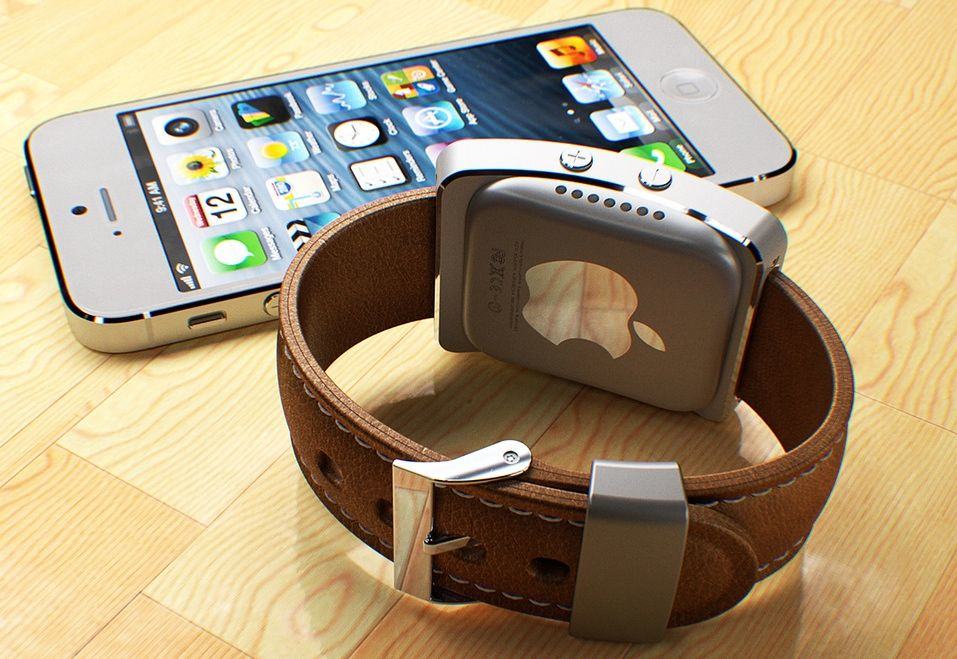
iWatch Rumor Roundup: Everything We Think We Know

The History of Apple iPhones: iWatch Rumor Roundup: Everything We Think We Know: iWatch Rumor Roundup: Everything We Think We Know This information was provided by  GIZMODO and  Brian Barrett Profile Brian Barrett Filed t...

iWatch Rumor Roundup: Everything We Think We Know

This information was provided by  GIZMODO 
barrett

Brian Barrett


Brian Barrett
Filed to: IPHONE EVENT 
  • APPLE
Today 12:03pm


  • Share to Kinja
  • Share to Facebook
  • Share to Twitter
  • Go to permalink


iPhone 6 and iWatch. Perfect companions. iPhoto: Martin Hajek
iPhone 6 and iWatch. Perfect companions. iPhoto: Martin Hajek
Apple will unveil its first foray into wearables at a special event in September, reports Recode’s John Paczkowski who previously reported that Apple had an October event scheduled for the iWatch, but the plans have changed.
Rumors of production delays have hounded the iWatch over the last few months, suggesting Apple might not even reveal the device until early 2015, but according to Recode’s report, the iWatch will actually debut alongside the two new iPhone 6 models during an event on September 9th.
Read more at http://www.cultofmac.com/292911/apple-reveal-iwatch-alongside-iphone-6-september-event/#umRKjPSjs3kHkMeK.99iWatch Rumor Roundup: Everything We Think We Know
If it feels like the promise of an Apple smartwatch has been looming forever, that's because it has. And its shadow helped birth the army of other smartwatches that we have today. But now, finally, the near mythical iWatch is rumored to arrive very soon. Here's what we think we know.

What's it called?

Colloquially, Apple's upcoming watch has been referred to as an iWatch, though there's not evidence that this might be its name outside of it following Apple naming conventions. Information about the size of its screen and the bevy of health features it will include suggest it might be actually be more of a "health bangle" anyway. Apple has acquired the trademark to "iWatch" in a number of countries, though that's pretty soft evidence.
Apple has filed patents for a wearable device with swappable screen modules that makes a reference to something called iTime, so that's a possibility as well, though Apple would probably be wiser than to blow the real name in a patent.

iTime: Smartwatch Patent Shows Apple's Broad Ambitions
This morning the folks over at AppleInsider discovered that Apple was granted a patent today for…Read more
For our purposes, we're going to keep calling it the iWatch and hope that Apple has something more clever up its, er, sleeve.

Design

One of the big (rumored) differentiators for the iWatch is design. That is to say, the iWatch is supposed to look good, unlike most of the other, grosser-looking options that are available right now. (Excluding the Pebble Steel and the Moto 360, of course.)
Evidence of this is backed up by a number of hires that Apple has made in the past few years. Hires like former CEO of Yves Saint Laurent Paul Deneve and Senior VP of Retail Angela Ahrendts, who helped revitalize Burberry as CEO without abandoning its heritage. We're talking legit fashion people, as opposed to tech people with an eye for pretty things.
What will all those expensive salaries come up with though? That's a much bigger question. We've seen concepts left and right, and although some of them look nice, none of them quite has that Apple flair. Unfortunately, there hasn't been a lot of information on what the iWatch will look like. No physical leaks of any sort. In a broader sense that iTime might offer some clues, as it shows a watch-type band with modules that can snap in and out. It's similar to the WIMM One from WIMM Labs, a recent Google acquisition.
iWatch Rumor Roundup: Everything We Think We Know
These sketches are broad, though, as patent sketches are, and it's meant to cover functionality not design, so it's of little help. Not to mention that patents aren't necessarily indicative of actual products; companies patent things all the time with no intention of ever actually making them. A slightly more substantial and interesting pair of reports came from Reuters and the Wall Street Journal, suggesting respectively that the iWatch could have a 2.5-inch screen, and that it might come in different sizes.
A 2.5-inch screen for a traditionally-shaped watch is nuts. The clunky Galaxy Gear clocked in at a mere 1.63-inches. So if the 2.5 inch screen rumor is true, it suggests something either more like a curved bracelet, or a giant hunk of Apple on your wrist. What does seem like a sure thing is that the iWatch will have an unscratchable sapphire glass watchface, due to recent evidence that Apple is producing "jewelry-grade" slices of the stuff. But other than that, the options are still pretty excitingly open.
iWatch Rumor Roundup: Everything We Think We Know


Posted by Unknown at 1:04 PM No comments:
Email ThisBlogThis!Share to XShare to FacebookShare to Pinterest
Labels: Apple, Apps, Blind, Color ID, FreeApp, I watch, iCloud, iPad, iPhone, iphone1g, iPod touch, PC, Siri, Visually Impaired
Older Posts Home
View mobile version
Subscribe to: Posts (Atom)

Total Pageviews

Contact Form

Name

Email *

Message *

Followers

Subscribe To

Posts
Atom
Posts
All Comments
Atom
All Comments

Popular Posts

  • How to label your pictures in the camera roll or Photo stream
    Have you ever wanted to know how to label your pictures in the camera roll or Photo stream? Now you can. This tip was discovered by  Ezekie...
  • Use Continuity to connect your Mac, iPhone, iPad, iPod touch, andAppleWatch
    All your devices. One seamless experience. Start an email on your iPhone and finish it on iPad. Or copy images, video, and text from ...
  • How to improve iOS 10 Battery Life
    f you’ve upgraded your iPhone, iPad or iPod touch to iOS 10, and are facing battery  life problems then check out the tips after the break...
  • The History of Apple iPhones: How to fix iPhone battery life in the age of Snapc...
    How to fix iPhone battery life in the age of Snapchat and Pokémon Go As more users spend their days in battery-demanding a...
  • iPad & iOS9 Accessibility Features Part3
    VoiceOver VoiceOver is the built in screenreader that comes with all Apple products. VoiceOver was updated for iOS9 with multiple voices ...
  • Navigating your iOS Device
    Navigation Basics Now that you’ve taken your first step into the iOS world with multitouch gestures, it’s time to learn how to navigate...
  • iPad & iOS9 Accessibility Features Part1
    The iPad and other Apple devices that use the new iOS9 operating system (like the iPod Touch and iPhone) received another round of updates ...
  • iCloud Backup and Restore
    Restore from an iCloud backup If you have a new iOS device, or if you need to restore your iOS device to resolve an issue, follow th...
  • Voiceover for iOS let voiceover be your guide
    Braille Displays iOS devices are fully compatible with many refreshable braille displays. You can connect a Bluetooth wireless braille ...
  • Apple IOS Excess ability for the disabled.
    Apple just keeps making it better for those with special needs. iOS7 and IOS8 comes with more features to make it easier for people...

What Apple Devices do you have

Search This Blog

Blog Archive

  • ▼  2017 (10)
    • ▼  October (1)
      • Set up Apple Watch using VoiceOver
    • ►  September (1)
    • ►  August (6)
    • ►  May (1)
    • ►  March (1)
  • ►  2016 (19)
    • ►  December (3)
    • ►  November (2)
    • ►  October (1)
    • ►  September (2)
    • ►  July (2)
    • ►  June (1)
    • ►  May (2)
    • ►  April (3)
    • ►  March (2)
    • ►  February (1)
  • ►  2015 (15)
    • ►  December (2)
    • ►  July (2)
    • ►  June (2)
    • ►  April (1)
    • ►  March (2)
    • ►  February (4)
    • ►  January (2)
  • ►  2014 (88)
    • ►  December (3)
    • ►  November (3)
    • ►  October (9)
    • ►  September (12)
    • ►  August (11)
    • ►  July (8)
    • ►  June (7)
    • ►  May (13)
    • ►  April (8)
    • ►  March (4)
    • ►  February (4)
    • ►  January (6)
  • ►  2013 (11)
    • ►  December (5)
    • ►  November (6)

Apps For Blind And Visually Impaired

  • pps For Blind And Visually Impaired
  • iPhone and iPad Apps For Blind And Visually Impaired
  • facebook Blind Iphone ipad Users

Translate

Other Pages for iPhone and iPad Apps For Blind And Visually Impaired

  • The White Crocus
  • Pinterest pin bored iPhone and iPad Apps For Blind And Visually Impaired
  • Google+page iPhone & iPad Apps for the Blind &VisuallyImpaired
  • Facebook groups iPhone iPad Apps for the Blind and VisuallyImpaired

My Blog List

  • Best of Blind Photographers
    Moving to a New Home
    17 years ago
  • Blind Photography? | Social Apertures
  • Blind Spot
    New Book: Discours et représentations du handicap. Perspectives culturelles
    6 years ago
  • Chelsea Stark Black & White Photography
    Hello everybody please check out my latest blog title Chelsea Ann Stark blog.
    11 years ago
  • Chelsea Stark Nature Photography
    Chelsea Stark Photography.com: "Haeley Dogs the best friends weekend" Yosemite Na...
    11 years ago
  • Chelsea Stark Photography.com
    Beautiful day for a road trip. VW Beetle
    9 years ago
  • iPhone and iPad Apps for the Blind And Visually Impaired
    How do I clean my AirPods?
    9 years ago
  • Robert Park Photography
    Here is Daniel finishing up a Robert B Park limited edition 40x53 Lumachrome print.
    10 years ago

And from a broader standpoint, how important to you is privacy through encryption as a factor

Should Apple break into the San Bernardino iPhone

Follow this blog

How important is privacy to you?

Labels

  • Accessibility (18)
  • AI (1)
  • airpads (1)
  • amp (1)
  • Android (1)
  • announce calls (1)
  • Apple (109)
  • Apple earbuds (1)
  • Apple ID (5)
  • Apple Store (3)
  • Apple Vis (8)
  • Apple Watch (3)
  • Apps (85)
  • AT&T (3)
  • audio (1)
  • backup (2)
  • battery usage (3)
  • Be My Eyes (1)
  • bigclock (13)
  • Blind (91)
  • blind people (3)
  • bumpkase (1)
  • can't look down (3)
  • CarriersUpgrading to the iPhone (10)
  • case (2)
  • Chelsea Stark (3)
  • Color ID (13)
  • Computer (1)
  • cracked screen (1)
  • Craigslist (1)
  • Cursor Size (1)
  • demise (1)
  • did battery (1)
  • eBay (2)
  • email problems (1)
  • eyeless 10 (1)
  • Facebook (2)
  • Facebook app (1)
  • Free (37)
  • FreeApp (40)
  • gestures (1)
  • grup (1)
  • handoff (1)
  • help (9)
  • horrible case (1)
  • Hotmail (1)
  • Hotmail email (1)
  • hotos (1)
  • I Clod (4)
  • I watch (1)
  • iCloud (20)
  • ID (1)
  • iOS (33)
  • iOS blind (1)
  • iOS 10 (5)
  • IOS 8 (4)
  • iOS 9 (2)
  • ios8 (11)
  • iPad (88)
  • iPad Air (6)
  • IPAD AIR 2 (3)
  • iPad case (3)
  • iPad mini (2)
  • iPad mini 4 (1)
  • iPad Pro 9 inch (1)
  • iPhon (12)
  • iPhone (107)
  • iPhone 4s (3)
  • iPhone 6 (6)
  • iPhone battery (3)
  • iphone1g (19)
  • iphone6 (12)
  • ipod (16)
  • iPod touch (19)
  • Jack (1)
  • Las Vegas Nevada (1)
  • Live special event (2)
  • Live video event (3)
  • Low vision (6)
  • Low vision aids (5)
  • mac (10)
  • Mail (2)
  • Medical ID (2)
  • Messages (3)
  • messges (3)
  • My phone (1)
  • New ipad (1)
  • notes (1)
  • NutKase.com (1)
  • NutKase.com ipad (1)
  • on off (1)
  • OS X (3)
  • osemite (1)
  • PC (6)
  • people (4)
  • phone calls (2)
  • phono labeling (1)
  • photo (1)
  • review (1)
  • search (1)
  • Siri (19)
  • Sprint (3)
  • T-Mobile (3)
  • text (5)
  • Townsquare Las Vegas Nevada (1)
  • unlock iphone (1)
  • Verizon (3)
  • video (28)
  • Visually Impaired (92)
  • voiceover (8)
  • wind (1)
  • zoom (4)

Contributors

  • Unknown
  • Unknown
Awesome Inc. theme. Powered by Blogger.